• Skip to primary navigation
  • Skip to main content
  • Skip to primary sidebar
  • Privacy Policy

Wolfheart

Helping small businesses make money using AI | AI Filmmaker | Content Creator

YoutubeLinkedinPinterest
  • Home
  • Services
    • Google Business Profile
    • SEO Content
  • About Me
  • Contact

Archives for June 2024

How To Save Hours Repurposing Content On Social Media

June 10, 2024

Last Updated on August 26, 2024 by Jan Barley

repurpose.ai

Repurpose.AI Can Save You Many Hours Of Frustration Posting Across Multiple Social Media Channels

Repurpose AI is a life saver for content creators.

One of the challenges of digital marketing is how long it takes to post content on your social media channels. It is a soul-sucking job, and I have long felt there must be a quicker way to repurpose content.

Here is my review of the time-saving, game-changing AI tool that has given me my life back!

What is Content Repurposing?

Content repurposing is not about tweaking aged content and reposting it. That’s more of a recycling activity. For instance, you can update your blog posts a bit, keeping Google happy.

Content Repurposing Is: –

  1. Creating one piece of content, such as a video
  2. Changing the format to different sizes or turning a video into an image (say, an Instagram post)
  3. Breaking up a longer video into shorts or turning it into a podcast
  4. Anything you can think of where content needs to be changed to suit another platform

Now, imagine how time-consuming repurposing is. You need video and image editing software and must keep switching, saving and editing. Yawn.

How To Quickly And Effectively Repurpose Content

OK, let’s suppose you have created a short-form video for TikTok. You want to post that video to Facebook & Instagram reels and your YouTube channel. Each upload will take around ten minutes, with keywords, tags, and descriptions added. So, that’s 40 minutes you’ve just kissed goodbye to.

The Repurpose AI stops all that faffing.

You can auto-publish (and schedule) without watermarks to most social media platforms, all in one place, saving you a ton of time. Repurpose has API access, so there are no concerns about some social media platforms getting squiffy about scheduling from Repurpose AI.

The time saving is extraordinary. You can repurpose your entire content for the week in one or two hours, maybe faster if you are not as slow as me.

If you are on Threads, you will have seen so many people talking about how they got burnt out from posting daily content with their digital marketing business. In my first month, I honestly thought I couldn’t maintain the busy schedule of posting to 3-4 social media platforms.

Are There Any Downsides To The Repurpose AI Tool?

Nothing is perfect, so there are a few minor niggles: –

  • The AI tool sometimes doesn’t get the character allowance right for the various platforms. For instance, Instagram and YouTube shorts have up to 2,000 characters, but Repurpose doesn’t permit enough characters. However, I rarely use anywhere near 2,000 characters. You’re not writing your life story, after all.
  • You cannot repurpose to Vimeo (not a big deal for me)

Is Repurpose AI Beginner-Friendly?

Yes, I think the platform is quite intuitive for beginners.

  1. Connect your social media channels
  2. Easy to navigate workflow
  3. Easy to add descriptions, etc
  4. Easy to publish and auto-schedule

Is There A Free Trial So I Can See If I Like Repurpose AI?

Yes, you can test Repurpose AI with a 14-day trial (no credit card required) and up to ten videos (at the time of writing June 2024) for TikTok, YouTube, Pinterest, LinkedIn, Snapchat, Audio Podcast, Zoom, DropBox, and Google Drive.

Is Repurpose AI Expensive

Your Repurpose AI account can connect up to 5 social media platforms for $20.75 per month (paid annually). For the time it will save you, that price is very reasonable.

Conclusion

Any software that saves time is a win in my book. If you plan to build a business long-term, you will want to save as much time as possible with your content creation. Creating something once and not having to hop from channel to channel is a huge benefit in my book.

Repurpose AI is a great social media management tool for content creators, influencers, digital marketers, businesses, and social media managers.

Disclaimer: There are affiliate links on this page. If you make a purchase, I may receive a small commission.


5 Top Tips To Create Instagram Stories That Work

June 6, 2024

Last Updated on August 26, 2024 by Jan Barley

Instagram stories

Instagram Stories Are Underated by Most People. I’ve Just Discovered That 94% Of People Prefer Instagram Stories to Reels

You are not alone if you’re new to Instagram and baffled by stories.

What are we supposed to do in Instagram stories? Share our personal lives, pictures of our dogs, products, offers or what?

Like you, I wanted to know more about Instagram stories and whether it was worth bothering to make an effort to create them regularly.

I got the heads up from someone on Instagram who polled her significantly sized audience about whether they preferred her reels or stories. 94% of her followers said they preferred stories.

Digging deeper into my research, I found that these high percentages weren’t a fluke. People genuinely prefer stories to reels or posts.

What the heck?

OK, let’s see how we can master this story thing then. Here is what I learned.

Tip #1: Be Consistent

The great thing about Instagram stories is you can schedule or create them on the fly. Experts suggest posting niche-related stories up to five times daily. Yeah, I know—groan fest.

Here’s the thing. Instagram’s reach has dropped significantly, even for some big accounts. People with 200k followers are getting a few thousand views. Even though Instagram recently announced they were leaning towards supporting smaller accounts, many people chatting on Threads agree the reach has recently dropped.

I’ve been scheduling reels and posts twice daily, and my reach is pathetic. OK, I only have 110 followers as I started Instagram about a month ago, but come on, Insta. Help a newbie out.

If stories are the way to go, let’s focus on them.

Tip #2: Create Interactive Stories

To engage readers, you can add quizzes, polls, questions, and many other features to your stories. If you’re new to stories and don’t have many followers, keep going. People cannot resist voicing an opinion, so this tip works well. Try adding a Q&A to your stories to encourage people to ask more questions.

Tip #3: Create a Story Arch

Stories have a beginning, middle and end, so your Instagram stories will do better with a story arch (I wish I’d known this earlier!) Create a hook to encourage people to watch your story and end with a cliffhanger – like your favourite series does. It drives you insane, but you must watch the next episode as soon as it’s live.

Instead of doing what I did, which was randomly posting drivel, preplan your content. Consider what would spark someone’s curiosity and keep a person reading your story content. What do people get from sticking around? Finish your story with a CTA (call to action) to urge people to return tomorrow for the next exciting instalment.

Example Of A Series Of Stories

  1. Story #1: Today, I decided to switch from a master resell rights (MRR) business model to a done-for-you business. Despite many people in my community making a ton of money, I see many others struggling with the tech setup and getting their first sale. I’m going to pay tomorrow.
  2. Story #2: Today, I purchased the done-for-you product and got blown away by the effortless process. It was so easy to get started. I am super excited to help people with this easy business.
  3. Story #3: I began exploring my dashboard and setting everything up. I love the setup because we have no choice but to work through the training linearly. As an ADHD brain, I do tend to jump ahead. It took me a matter of minutes to add the few details needed. It will take 5-7 days to get my personalised store, but I already have my affiliate link to my shop.
  4. Story #4: This business is a Shopify store with 185+ products, many of which are low ticket PLR & MRR, done-for-you content like the 735 aesthetic stock photo collection.
  5. Story #5: I attended a live welcome webinar last night. The lady who owns the company is so lovely. She started this business to build a family community based on integrity without the massive competition you often see in MRR circles. She is humble and committed to helping us all succeed.
  6. Story #6: Today, I don’t want to do my day job as a freelance writer. I feel so driven to focus everything on this business. Sigh. My gut feeling is that this business is so easy compared to the MRR businesses that it won’t take long to build a sustainable business.
  7. Story #7: Last month, I did a Pinterest SEO course, which has ramped up my website traffic and CTR and stoked my monthly views on Pinterest. I’ve been sorting out affiliate links for products I know and like. Many people make a full-time income from Pinterest. As there are 185+ products with the DFY business, that’s given me a load of pin opportunities to drive traffic to my Shopify store.
  8. Story #8: I didn’t realise we get 12 months of done-for-you content with this business. Creating content is so time-consuming, and I’m always looking for ways to speed up the process. The shop has a 600 video reel package plus bonuses for personal or MRR rights. There is so much value here.
  9. Story #9: All of my social media handles are dailyincomewithjan. I used that as my domain for the MRR business, but I will switch it to the DFY business as soon as my store is ready. I don’t know if I will continue with the $900 MRR product. Even though it’s a lot of money, I’m not entirely comfortable with it because of the tech setup and connecting to Stripe, which does not like MRR and PLR products.
  10. Story #10: I love this business. We get a 70% commission on the DFY business. We get two tiers of commission -10% and 5%. It’s not MLM. It’s a genuine affiliate program with our own Shopify store. Imagine a year ahead when passive income comes from the two tiers. I love this business model.

Tip #4: Use Highlights Sparingly

Use highlights to categorise tutorials, FAQs, events and your best stories. Plan a strategy for where to feature your highlights, considering followers and non-followers.

Tip #5: Use Captions, Hashtags and Text Overlay

As many people watch content without sound, always add captions if you’re speaking. Your text overlay could be a hook, and you can use niche-specific hashtags. Put those out of the way, maybe at the bottom, so the story looks tidy. I keep a copy of my hashtags on an Excel spreadsheet on the laptop and notes on my phone, so it’s easy to copy and paste.

Anyhoo, I am here with you getting started with Instagram stories. Creating reels is tedious, especially if they aren’t performing. It makes sense to focus on what gets the best results, so let’s do this thing!

Disclaimer: There are affiliate links on this page. If you make a purchase, I may receive a small commission.

The Top 3 Popular Master Resell Rights Products Review

June 6, 2024

Last Updated on February 11, 2026 by Jan Barley

master resell rights products

Master Resell Rights Products Are Selling Like Hot Cakes, But These 3 MRRs Continue Leading the Way

Master resell rights products are dropping into the market like confetti at a wedding. Still, they aren’t all worth the money, and many of them have fallen by the wayside.

Some are massively overpriced and don’t provide the support necessary for complete beginners.

Master resell rights products are an excellent introduction to digital marketing. Still, avoid approaching this business ONLY to  sell MRR products.

Instead, buy the course, learn the skills and utilise them to supercharge your marketing efforts and income.

The goal for anyone in this business should be to build recurring passive income sources.

I am reviewing the top 3 master resell rights products. These MRR’s have stood the test of time and have loyal communities.

  1. The Roadmap 3:0
  2. Inner Bloom
  3. Catalyst Collective

Please note that this list gets updated regularly. If I see a company not following ethical practices, or failing to take care of it’s customers, they come off this list. Sadly, that’s proving to be a regular occurance. It’s the reason why a non-MRR is #1 on this list and will remain there for the foreseable future.


#1: The Roadmap 3:0: Now Offers An Affiliate Model

The Roadmap was one of the first MRR products to spring onto the scene. It has stood the test of time and has an excellent reputation in the market.

The Roadmap is a step-by-step, complete branding and marketing course. It teaches you everything you need to know to create an online business.

You learn subjects including:

  • SEO
  • Blogging
  • Affiliate marketing
  • Selling on Stan Store
  • Create sales funnels
  • How to build a website
  • Automate your business
  • Create email campaigns
  • How to market your business
  • Video editing with free software
  • TikiTok, Facebook, Instagram, Pinterest & YouTube
  • And much more

It doesn’t matter what your niche is, The Roadmap is solid training for any business.

Roadmap updates content regularly.

Price: $597.00
Payment Plans: Yes
Community: Yes
Refund Option: No
Who is The Roadmap Suitable For? Complete beginners

Learn More About Roadmap 3:0 HERE


#2: Inner Bloom: A Unique Low-Cost Business for Women

Inner Bloom is the first wealth and well being academy that offers master resell rights.

Inner Bloom is a beautiful course and community created by women for women.

I added Inner Bloom to the list of top popular master resell rights products because it is unique digital product and it is super low cost.

Inner Bloom is more than a master resell rights product. It is the chance to blossom into the woman you were always meant to be and make money selling a genuinely priceless opportunity for female growth.

When you join Inner Bloom, you learn about business and social media, but you also get a deep dive into personal and spiritual development.

  • 70+ Healers, Practitioners & Coaches: A supportive female community with a wide range of tools and resources
  • Mental Well-Being: Learn to develop a healthy mindset, exposing limiting beliefs and learning self-empowerment
  • Emotional Well-Being: Inner Bloom supports women healing from past trauma and transforms self-sabotage into healthy patterns
  • Spiritual Well-Being: Explore your spiritual side in a safe, supportive, environment
  • Nurturing Community: Inner Bloom is an online sanctuary for women to retreat from the challenges of the patriarchal world

Price: $222
Payment Plans: No
Community: Yes
Refund Option: No
Who is Inner Bloom Suitable For? Beginners or more experienced digital marketers

Read: My full review of Inner Bloom


#3: Catalyst Collective: Not an MRR But…

So many master resell rights communities have been crumbling in the latter part of 2024 that I decided to add the Catalyst here.

Why?

Because I stand behind the Catalyst 100%. The training is suitable for any business that wants to master social media marketing, learning from an ex Meta executive.

I switched to the Catalyst in September 2024. I’d had issues with some of the MRRs I purchased and was fed up of running down empty alleyways.

Best of all, it’s risk-free because Brooke offers a “no questions asked” 48-hour refund.

Brooke Shelton, the founder, is an ex Meta executive who raised billions of dollars in ad revenue and worked on AI machine learning.

It’s hard to put into words why everyone loves the Catalyst. Most people, including myself, say they will never buy another course again after joining the Catalyst.

Is Catalyst Collective good? Oh boy, is it ever! The training is unrivalled and I wish I’d found the Catalyst before diving into buying MRR courses.

Price: $399
Payment Plans: Yes
Community Support: Yes
Refund Option: Yes 48 hour refund (no questions asked)
Who Is the Catalyst Collective Suitable For: Beginners, experienced digital marketers and any business that wants to get sales from social media marketing

Read My in–depth review of Catalyst Collective


What I Don’t Like About MRR Products & Courses

My biggest concern is about payment. Because master resell rights products give you 100% profit, you must set up your own payment, which goes directly to you.  Whilst that sounds fantastic, it isn’t, and I will tell you why.

Most payment options are PayPal and Stripe. Here’s the problem with that:

  • You need a business account with Paypal but even with that, consistently large amounts landing in your account could get flagged. Additionally, f a customer complains, your Paypal account could get frozen or even closed
  • Stripe begun refusing new accounts and closing existing accounts promoting master resell rights products

Personally, I couldn’t handle the stress of worrying about losing my PayPal or Stripe accounts. That is why I prefer an affiliate business model because the company handle all the payments, customer complaints etc. I like the hands-off approach.

Which Master Resell Rights Product is Best For Beginners

There are significant issues with master resell rights products (MRR) and, as you can see below, I have removed several from this list during the later part of 2024. 

Inner Bloom is for women and it is perfect for beginners. It’s also one of the lowest priced master resell rights products available. It has an excellent reputation, too.

Whether you want a gorgeous low cost MRR to resell or long for being among a supportive community of like-minded women, Inner Bloom really has it all. In addition, selling a $222 course is MUCH easier than trying to sell a $1000 master resell rights product.

The Roadmap  is great if you have the budget. I like that the company are staying ahead of the times and moving into an affiliate model.

MRR Products I Removed From This List

I will NEVER recommend a product that is unethical, does not support its customers or develops a negative reputation.

I update this list regularly for those reasons.

  1. Lepo Max:  This company removed the creator community in October 2024. In addition, you now have to download all the training files and upload to your own hosting. For anyone, let alone beginners, it’s a ridiculous decision.
  2. Simply Passive: I removed Simply Passive from this list because they recently (July 2024) announced withdrawing Facebook community support. That’s a bad move in my opinion. Community support is vital to digital marketing success.
  3. Digital Wealth Academy (DWA): I removed this product because there are rumours of unethical practices (August 2024)
  4. Ultimate Branding Course (UBC): UBC is an excellent master resell rights product, but it is also around the $500 price. I only removed the Ultimate Branding Course from this review because the Catalyst is better and more affordable. It’s still a great product.

Conclusion

It’s important to know that starting a digital marketing business can be overwhelming. You have so much to learn.

I recommend Inner Bloom and the Roadmap as MRR products because they have continually showed integrity and care for members.

That’s as rare as unicorn poop in this industry!

When you begin creating social media content, it can be exhausting. It was for me and many of my digital marketing connections.

I believe we should be in the business to help others and NOT only focus on making money.

Integrity should prevail. The money will come if you genuinely care about helping others to financial freedom.

Disclaimer: There are affiliate links on this page. If you make a purchase, I may receive a small commission.
3 Ways to Get Your Content Ranking on Google?

June 4, 2024

Last Updated on August 26, 2024 by Jan Barley

rank content on google

Rank Content on Google and See Your Traffic & Sales Increase

You might assume it takes months to rank content on Google, especially in a competitive industry. The experts suggest you cannot rank without a gazillion backlinks and high domain authority. That, however, is untrue. With the right SEO content strategy, you can dominate the SERPs (search engine results pages)

With the right keywords and well-written SEO content, it’s surprising how quickly you can rank.

I completely changed my focus on Wolfheart a month or so ago. It was my SEO writing website for clients for three years. As I am moving away from client work into digital marketing, I deleted all my content and started again.

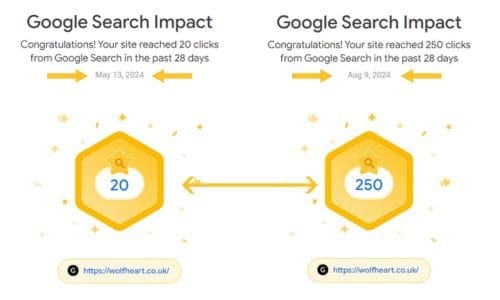
Within two weeks, several of my articles ranked as snippets (the disadvantages of faceless marketing) and some on the first page (building a faceless brand). I haven’t worked on my site properly with SEO for a long time, but I know how to write SEO content and the types of keywords and keyword phrases to use.

SEO Is Easy When You Know How

If you don’t have experience in SEO writing, consider using an AI SEO writer. I recommend SEO Writing, which has a free aspect. You can write 5,000 words per month. It’s also low cost if you upgrade to the paid version.

The trick is to find low-hanging fruit and low-difficulty keywords and then write content that helps the reader specifically. Gone are the days when you could write purely to try and rank on SERPs.

After the Google Helpful content update on the 14th of September, 2023, many websites tanked, including this one. Small bloggers really suffered.

Some users reported traffic dropping by 80%. That’s only a problem if you don’t know what to do. Or, you have thousands of search engine-targeted pages rather than user-centric content.

I recommend reading the Google Helpful content guidelines to understand what you should and shouldn’t be doing if you want your pages to rank.

Tip #1: Write SEO Content

I studied SEO in 2020, by taking a few free courses, such as Hubspot’s FREE SEO certificated course. It won’t teach you everything about being a writer, but it’s a good start to understanding SEO. I earned a good income as an SEO writer before I began transitioning to digital marketing.

SEO writing is about finding keywords and phrases that are likely to rank. If you have no domain authority (DA) you need to target low difficulty keywords. I’ll write about that soon, I promise.

google results

From 20 clicks/28 days in May to 250 clicks/28 days in early August. This Is Increasing Traffic to My Offers

Driving traffic to your offers or products is the goal for every business online. If you aren’t taking advantage of free organic traffic, you are missing an opportunity to get more sales. Check my SEO writing services if you need help ranking content on Google SERPs.

If the thought of writing SEO content makes you want to stick pins in your eyes, you could consider an AI SEO writing tool. Some of them aren’t great and sound robotic. The  SEO writing software is pretty good. With the free version, you get 5,000 words and up to 5 articles. It’s one of the lowest proced AI writers at only $14 a month for up to 50 articles with unlimited words. That would save you a truckload of time.

Tip #2: Using ChatGPT for Final Drafts

If you’re not a writer and are unsure if your content is good enough for publishing, you can use ChatGPT to tighten up the content for SEO.

When you’ve finished writing the content, post it in ChatGPT and use a prompt similar to the one below:

” Is this page properly optimised for the search term [xxx]? Does it include enough semantically related terms to be thorough? If so, just tell me it’s good. If not, add more so it is fully optimised, but ensure it reads naturally and makes perfect sense. Use bold text on all new content and keywords you add. Here’s the content…”

After that, use the prompt.

“Let’s add an extra keyword-rich section at the bottom. Make it benefit-driven and read naturally”

And, finally…

“Is the new page with the changes and extra section now fully optimised for the term [keyword phrase], and are there any other secondary keywords I can add?”

Succeeding with SEO is not about working harder. It’s about working smarter.

Tip #3: Use Pinterest to Boost Your Traffic

If you don’t know it yet, Pinterest is a powerful search engine. It is not a social media platform like the others. I’m gaining significant traction for my digital marketing business and traffic to my website. Within a couple of months I am up to 5k monthly views and I’m now ramping up my efforts after taking a Pinterest SEO course.

It can be tricky to know where to start with Pinterest. Check my post about the Best Pinterest courses or best Pin design there is a link to a free Pinterest strategy guide, which got me started on improving my pin strategy.

Don’t miss out on Pinterest. I repeat, it is a potential goldmine. However, read my post about how NOT to get your Pinterest account suspended.

Continually work on your SEO for your website and the social media descriptions you write. It pays off in the end.

Note: 26th August: My CRT is now 1.8% and 300 clicks in 28 days

Disclaimer: There are affiliate links on this page. If you make a purchase, I may receive a small commission.

Metricool Social Media Management Review

June 1, 2024

Last Updated on February 11, 2026 by Jan Barley

metricool social media management

Metricool Outdoes Most of the Social Media Management Schedulers On the Market. 4.5* Trustpilot reviews

I’ve been using the free version of the Agorapulse social media management tool for a while. As my digital marketing efforts have ramped up, having the availability to schedule only ten posts a week isn’t enough.

As Agorapulse is $49 a month, I didn’t want to pay that much. I shopped around for a better alternative and found Metricool, which is very cool and low-cost!

The Metricool Platform Has:

  • A social media planner
  • Automated reports
  • Best times to post (that can change in time, so this is super helpful)
  • Best hashtags
  • Reply to comments from the platform (very cool)
  • AI copywriting assistant
  • Competitor analysis
  • Historical data
  • SmartLinks

Metricool has 1.7 million users. You can connect all of your social media platforms and your website. I found that it was easy to use to connect my WordPress website. All you do is install the Metricool plugin and add the verification code, and you are connnected.

Things I Like About Metricool

Competitor Analysis

The competitor analysis enables you to inspect influencers in your field and identify trends. You can track your competitors on YouTube, Instagram, Facebook, Twitter, and Twitch. You can track up to 100 of your competitors on the paid plans.

That tool can significantly improve your content marketing strategy.

Inbox Functionality

Instead of spending hours hopping from one social media channel to another responding to comments, you can manage everything from your Metricool dashboard. Wowza!

This one tool alone can save you hours each week.

Content Planner

You can schedule up to 50 pieces of content on the free plan. It’s one of the most generous free plans I have seen in social media management platforms.

You can create reels, pins (it’s best to schedule directly with the Pinterest scheduler), TikTok videos and more. The colour-coded calendar is pleasantly visual, so you can monitor what’s coming up and choose the best times for posting content for each social media channel.

After scheduling your content, it is easy to edit and change dates, times, etc.

AI Assistant

Sometimes, I write descriptions ahead, but it is time-consuming. The Metricool AI Assistant is fantastic and dramatically shortens the time needed to create text for your content and avoid the dreaded writer’s block.

You can choose tone of voice, length and more.

Metricool Free Plan Is For Life

There is no 30-day trial as there is with many of the social media schedulers.

What you get:

  • Up to 50 scheduled posts each month
  • Up to 3 months of historical data
  • Analyse up to 5 competitor profiles
  • Use the AI assistant up to 3 times
  • All social media platforms except Twitter & LinkedIn

The paid version starts at ONLY $18 a month if you pay annually or $22 if you choose monthly payments.

Metricool is fantastic value. It is intuitive to use, and you get so much for so little money. I am spreading the word because most social media scheduling platforms are overpriced and tricky to use.

Metricool has a 4.5* Trustpilot rating.

Try it, and let me know how you get along.

Disclaimer: There are affiliate links on this page. If you make a purchase, I may receive a small commission.

  • « Go to Previous Page
  • Page 1
  • Page 2

sidebar

Blog Sidebar

Recent Posts

  • How to Easily Start an Online Business with ChatGPT
  • My AI Filmmaking Workflow: 5 steps to Video mastery
  • 12 Profitable Business Ideas for Women Who Want Time Freedom
  • Best AI Tools for Cloning Your Voice and Avatar
  • Side Hustles For Busy Moms: 9 Ways To Make Money Fast
  • Galaxy AI: Thousands of AI Tools for a Low Cost
  • VidIQ vs TubeBuddy: Which is Best for YouTube Growth?
  • Is Google Business Profile Worth It? My Professional Opinion
  • 10 Blogging Mistakes You Should Never Make
  • Best AI Writer – My Personal Experience of KoalaWriter
  • Is AI Overview the End of Organic Traffic?
  • KoalaWriter vs SEOWriting AI: Which is Best?
  • Is CapCut Worth It? My 8-Month Review
  • Best Pinterest for Beginners Course Review
  • Best YouTube Growth Tools to Boost Your Channel

Categories